

If you have several devices connected to your home Wi-Fi, managing a VPN on every device can become frustrating. Your phone may need one app, your laptop another, while your smart TV or gaming console may not support a VPN application at all.
A VPN-enabled router offers another approach. Instead of installing software on each device, you can configure the VPN connection directly on your network equipment.
This setup can make VPN management easier, especially in homes with many connected devices. However, it also has some limitations that you should understand before switching from a regular VPN app.
Let’s look at how this technology works, its benefits and drawbacks, setup requirements, and when it makes sense for your home.
What Is a VPN Router?
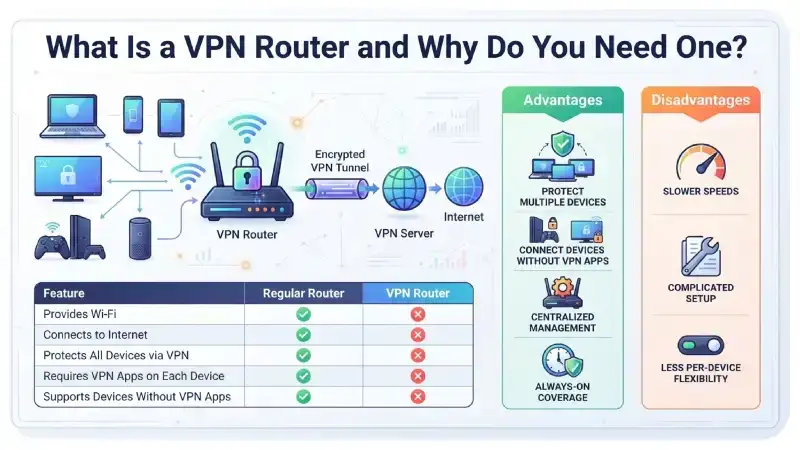
A VPN router is a network router that can connect directly to a VPN service. It works as a VPN client and can route network traffic through a secure VPN connection.
With a standard home setup, your devices connect to the router, and the router sends their traffic through your internet service provider.
When you configure a VPN on compatible network hardware, the connection can follow this path:
Device → VPN-enabled router → VPN server → Internet
The main advantage is centralized management. Instead of configuring separate VPN applications on every compatible device, you can manage the connection from the router.
For example, consider a home with two smartphones, three laptops, a smart TV, and a gaming console. Installing and maintaining separate VPN software across all those products can take time.
A compatible router can provide a simpler network-level solution.
However, the exact features depend on the router model, VPN provider, firmware, and configuration.
How Does a VPN Router Work?
The router creates a connection between your local network and a remote VPN server.
Normally, your router sends internet traffic directly through your ISP. After configuring a VPN client, supported traffic can travel through an encrypted VPN tunnel before reaching the wider internet.
The basic process looks like this:
Your device → Router → Encrypted VPN tunnel → VPN server → Website or online service
The VPN encrypts traffic between your device and the VPN server. Online services may also see the public IP address associated with that VPN server rather than your normal home IP address.
However, a VPN does not make you completely anonymous.
Websites and applications can still identify you through accounts, cookies, browser information, device settings, and other tracking technologies. A VPN should therefore be viewed as a privacy and network-security tool, not an invisibility system.
VPN Router vs. Regular Router
A regular router performs essential networking tasks. It connects devices, provides Wi-Fi, manages local traffic, and communicates with your internet service provider.
Some modern routers can also operate as VPN clients.
The important specification to check is VPN client support.
VPN passthrough and VPN client functionality are different.
VPN passthrough allows a VPN connection created by another device to pass through the router. A router with client functionality can establish the VPN connection itself.
If your goal is to protect connected devices through one central configuration, you need the second type.
Always check the manufacturer’s specifications before purchasing equipment for this purpose.
Why Use a VPN Router?
A router-based VPN can be useful in several situations.
1. Connect Multiple Devices
One of the biggest advantages is centralized coverage.
A modern household can have phones, tablets, computers, televisions, streaming devices, smart speakers, and game consoles connected to the same network.
Installing separate software on every compatible product may not be practical.
With a properly configured router, supported traffic can use the same VPN connection without requiring an individual application on each device.
2. Support Devices Without VPN Apps
Not every internet-connected product supports traditional VPN applications.
Smart TVs, gaming consoles, streaming devices, and some smart-home products may have limited software options.
A network-level configuration can allow these devices to use the VPN connection through the router.
The device simply connects to your Wi-Fi or Ethernet network as usual.
3. Manage the Connection From One Location
Managing several VPN applications can become inconvenient.
You may need to install updates, sign in, choose servers, and check connection settings across different devices.
Centralized configuration reduces some of that work.
Instead of opening an application on every computer or phone, you can manage the main connection from the router’s administration interface.
4. Automate the VPN Connection
A VPN application usually requires you to connect manually or enable automatic connection settings.
A configured router can establish the VPN connection automatically.
This means devices joining the network can use the configured connection without requiring separate software.
There is an important limitation. If the VPN connection fails, traffic behavior depends on the router’s configuration.
Some setups can automatically fall back to the normal internet connection. If privacy is important, look for a router or firmware that supports a reliable kill switch or equivalent traffic-blocking feature.
What Are the Downsides?
This type of setup can simplify network management, but it also has disadvantages.
VPN Speed Can Be Lower
Encryption requires processing power.
When several devices send traffic through the same VPN tunnel, the router has to handle that additional workload.
An older or inexpensive router may struggle when multiple devices use the connection at the same time.
Performance also depends on your internet plan, VPN server, server distance, VPN protocol, and general network conditions.
A fast internet package does not guarantee the same speed when using a VPN.
Setup May Be More Technical
Installing a VPN application is often easier than configuring a router.
Depending on your equipment, you may need to enter server information, upload configuration files, select a protocol, or adjust advanced network settings.
The process differs between manufacturers and VPN providers.
One Connection May Not Suit Every Device
Suppose you want your laptop to connect through a VPN server while your smart TV uses the normal internet connection.
A basic configuration may send both devices through the same server.
More advanced routers can offer features such as policy-based routing, device groups, and split tunneling.
These options provide greater control, but they can also make the network more complicated to manage.
VPN App or VPN Router: Which Should You Choose?
The right choice depends on how many devices you need to protect and how much control you want.
Choose a VPN app if you mainly need the service on one or a few personal devices. Applications are usually easier to install and often provide simple server switching and per-device controls.
They are a practical choice for laptops, smartphones, and tablets.
Choose a VPN router if you want multiple devices on your home network to use one VPN connection. This can be useful for smart TVs, gaming consoles, and other products that do not support traditional VPN applications.
A simple rule can help:
One or two devices → VPN app
Many home devices → VPN router
For many beginners, starting with an application is simpler. If managing several devices becomes inconvenient, a compatible router can provide centralized coverage.
How Do You Set Up a VPN Router?
The exact process varies by manufacturer and VPN provider, but the general setup usually follows these steps.
Step 1: Check Your Router
Find the exact model number of your router.
Then check the manufacturer’s official specifications or support documentation.
Confirm that it supports VPN client functionality.
Do not assume that a product with the word “VPN” in its specifications can automatically run a VPN client.
Step 2: Check Your VPN Service
Your VPN provider should explain which routers and protocols it supports.
Some providers supply configuration files that can be imported into compatible hardware.
Check the provider’s current instructions before making changes.
Step 3: Open the Administration Panel
Connect to the router and open its administration interface.
Depending on the manufacturer, VPN settings may appear under sections such as:
- VPN
- Advanced Settings
- Network
- Security
- Services
The menu names vary between products.
Step 4: Enter the VPN Details
Follow the information supplied by your provider.
You may need details such as:
- Server address
- Username
- Password
- VPN protocol
- Encryption settings
- Configuration file
Enter each setting carefully. A small configuration error can prevent the connection from working.
Step 5: Test the Connection
After activating the VPN, connect a device to your network.
Make sure websites load normally and check your public IP address if necessary.
Test several devices if you want the whole household to use the connection.
Also test what happens when the VPN server disconnects. This helps you understand whether your router blocks traffic or switches back to the regular connection.
Which VPN Protocol Should You Use?
Your router may support several VPN protocols.
Two common options are OpenVPN and WireGuard.
OpenVPN has been widely used for years and has support across many platforms and VPN services.
WireGuard uses a modern design and is known for its relatively simple architecture and strong performance on compatible hardware.
The right option depends on your router and VPN provider.
Do not assume that one protocol will always provide the fastest experience. Router processing power, server location, connection quality, and VPN configuration can all affect performance.
Can It Protect Every Device?
Not automatically.
A router can route connected traffic through a VPN, but the exact behavior depends on its configuration.
Some products let you select individual devices. Others send most or all network traffic through the VPN.
You should also remember that VPN protection has limits.
A VPN cannot automatically stop phishing attacks, malicious downloads, weak passwords, unsafe websites, or account theft.
Good online security still requires updated software, strong passwords, multi-factor authentication where available, and careful browsing habits.
What Should You Look for When Choosing One?
If you are considering purchasing a router for VPN use, do not focus only on advertised Wi-Fi speeds.
VPN Client Support
This is one of the most important specifications.
Make sure the device can act as a VPN client if that is your intended use.
Processing Power
VPN encryption can increase the workload on a router.
Stronger hardware may provide better performance when several devices use the connection simultaneously.
Protocol Compatibility
Check whether the router supports the protocol recommended by your VPN provider.
If you prefer WireGuard, for example, confirm that both the router and provider support it.
Firmware Updates
Regular firmware updates are important for security, bug fixes, and feature improvements.
Look for hardware that receives ongoing manufacturer support.
Advanced Routing Features
If you want some devices to use the VPN while others connect normally, look for features such as split tunneling, policy-based routing, or device-based VPN rules.
These features provide more flexibility than a basic all-or-nothing configuration.
Is a VPN Router Good for Gaming?
It can be useful in certain situations, but it does not automatically improve gaming performance.
A VPN can change the route between your network and an online service. Depending on the route, this may sometimes help with connectivity issues. In other cases, it can increase latency.
Gaming performance depends on factors such as:
- Your physical location
- ISP routing
- VPN server location
- Game server location
- Network congestion
- VPN protocol
- Router hardware
If low ping is your main priority, test the connection before using it for competitive gaming.
For fast-paced online games, even a small increase in latency can affect the experience.
Is a VPN Router Worth It?
Whether this setup makes sense depends on your network.
It can be useful if you have many connected devices and want centralized VPN management.
It is also helpful when some of your products do not support VPN applications.
On the other hand, configuration can require more technical knowledge. Performance depends heavily on router hardware, and advanced per-device controls may require additional setup.
If you only need VPN protection on one laptop or phone, an application may be more convenient.
If you want several home devices to share one VPN connection, network-level configuration may be a practical option.
Common Mistakes to Avoid
Before configuring your network, watch out for these common mistakes.
Buying a Router Without Checking VPN Client Support
Some products advertise VPN features but only support passthrough.
Always check the exact feature list.
Choosing a Router Based Only on Wi-Fi Speed
A router may advertise impressive wireless speeds but still perform poorly when handling encrypted VPN traffic.
Check its VPN performance and processing capabilities when possible.
Sending Every Device Through the VPN
Not every device necessarily needs the same connection.
Streaming, gaming, work, and smart-home devices may have different requirements.
Consider whether you need full network coverage or selective routing.
Ignoring Firmware Updates
Outdated router software can create security and compatibility problems.
Keep the firmware updated when the manufacturer provides stable releases.
Final Thoughts
A VPN router connects your home network directly to a VPN service, allowing supported devices to use the connection without installing a separate VPN application on each one.
Its biggest advantage is centralized management. This can be particularly useful in homes with many devices or products that cannot run traditional VPN software.
However, there are trade-offs. Router hardware can affect VPN speed, setup may require technical knowledge, and advanced routing features can take time to configure.
For a single laptop, phone, or tablet, a VPN app is often the simpler approach. For a household with many connected devices, a compatible router can provide a convenient network-level solution.
Before choosing either option, consider how many devices you have, whether they support VPN apps, how much control you need, and what performance your hardware can deliver.






Leave a Reply